Selamat Hari Raya Idul Fitri 1440 H

Zettagrid Indonesia dengan segenap kerendahan hati mengucapkan
“Selamat Hari Raya Idul Fitri 1440 H, Mohon Maaf Lahir Dan Batin”
Menjadikan diri kembali suci penuh fitrah dalam silaturahmi yang penuh berkah

Zettagrid Indonesia dengan segenap kerendahan hati mengucapkan
“Selamat Hari Raya Idul Fitri 1440 H, Mohon Maaf Lahir Dan Batin”
Menjadikan diri kembali suci penuh fitrah dalam silaturahmi yang penuh berkah

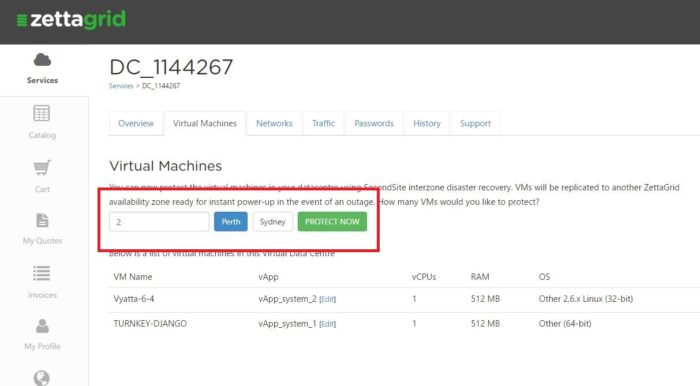
Follow through the payment gateway and confirm your selection.
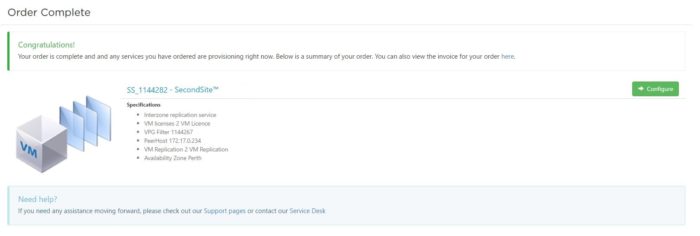
Go back to your MyAccount page and witness that a new VDC with the prefix SS is being provisioned and appears as below.
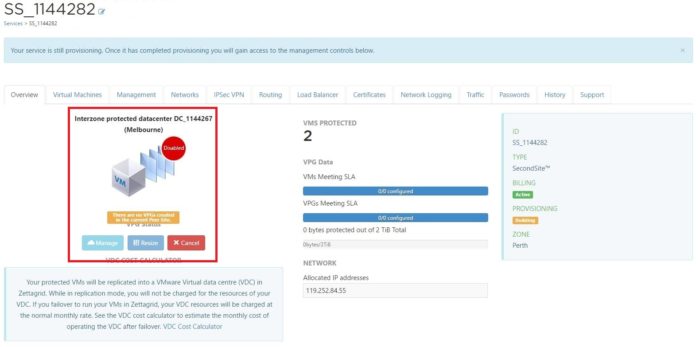
As you can see it is highlighting a few important items;
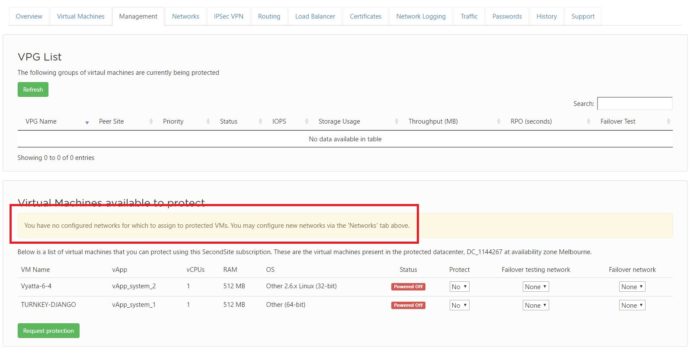
Click the Management tab and see that there are no networks created as yet.
These networks are what the VMs will be attached to in the VDC in the new availability zone. This might be the same or completely different to what they are in the current availability zone.
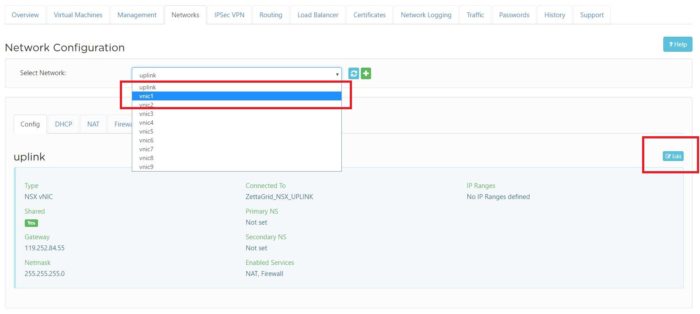
Head to the Network tab and begin the network configuration.
Select an uplink and then hit on the edit button on the right hand side as per below.
Enter in the relevant information that you would like the production network to be. Ensure that you select to make the network Connected.
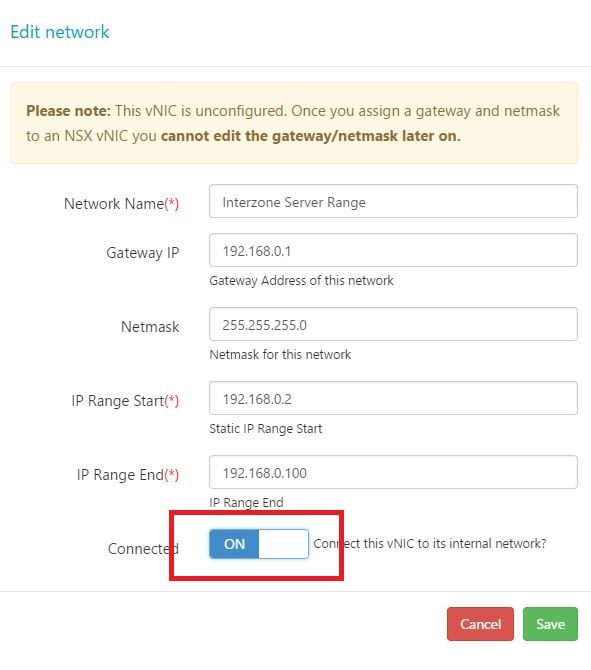
Now you have configured the production network. SecondSite also allows you to perform test failovers which are typically unrouted or internal networks that do not have any outbound connectivity. You will need to repeat the above process and create a test network for your VMs.
Please note: The networks you have created are simple the VLANs that the VMs will be tagged with. If you have advanced firewall rules, BGP or NAT rules setup in your production VDC then you will need to also create these on the new SecondSite instance as it is entirely separate from your production VDC. For assistance with that head here – Creating Networks for Interzone Replication
Return back to the Management tab and select the relevant networks and IPs for both production failover network and test failover network.
Make sure you select to enable protection for all the VMs you wish to protect and then hit Request Protection.
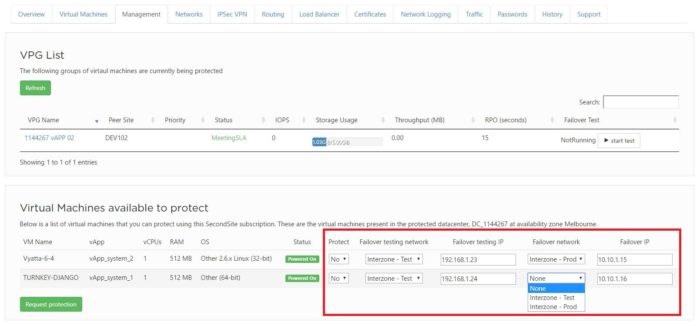
The VMs will now begin replicating. The initial replication can take considerable time (can be hours or days) as it will be potentially transferring multiple terabytes across the country so please be patient.
Once complete you will be able to see the status of the replication from the Overview page of the service as per below. You will be able to see how many VMs are protected and the overall information on whether they are meeting a 5 minute RPO target SLA or not.
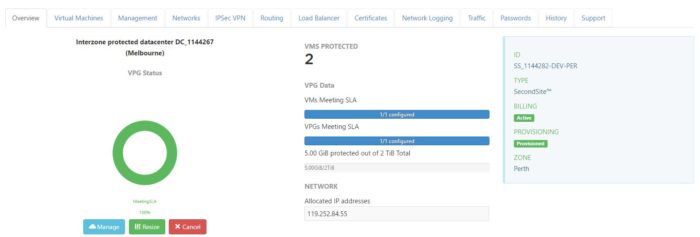
Proceed over to the Management tab again for specific information about each VM under protection.
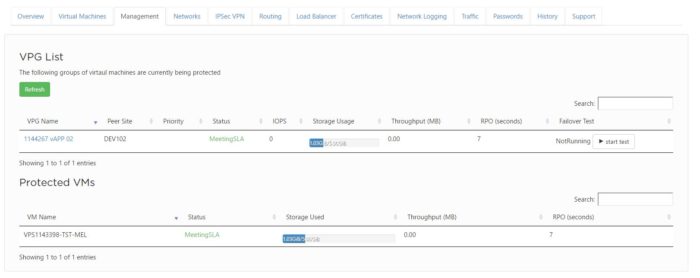
Congratulations you have now successfully setup Interzone replication.
For further information about Zettagrid product and service do not hesitate to contact sales@zettagrid.id or directly contact to +62-811-28-38-78 and +62-21-2789-9962
Details to Connect:
Gateway: veeam.[per|syd|mel].zettagrid.com
username: VCC_nnnnnn
password: xxx
These details are available in your Veeam Subscription in My Account.
Veeam B&R Setup and Configuration:
In the B&R Console select the Backup Infrastructure Menu and right click on Service Providers
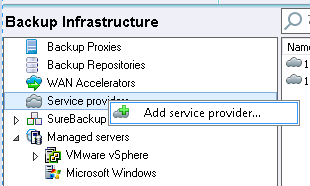
Click the Add Service Provider and enter in the following
Name: veeam.[per|syd|mel].zettagrid.com
Port: 6180 (default)
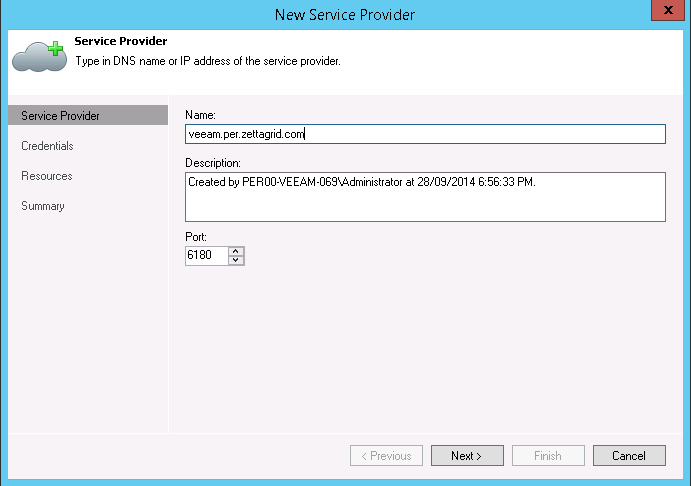
Verify the SSL Certificate and Click on Add to enter in Cloud Connect Credentials
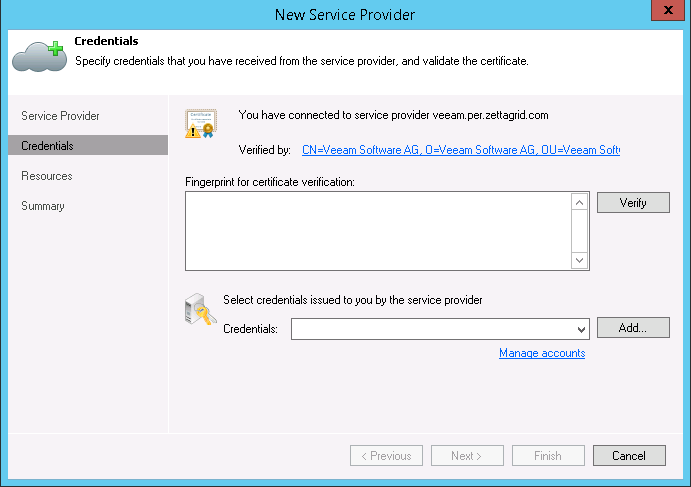
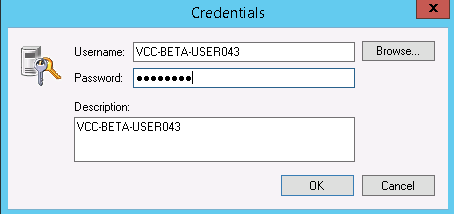
Hit Finish and wait for the Connect to Zettagrid Cloud Connect completed. Once done confirmation of your Repository and Quota will be displayed
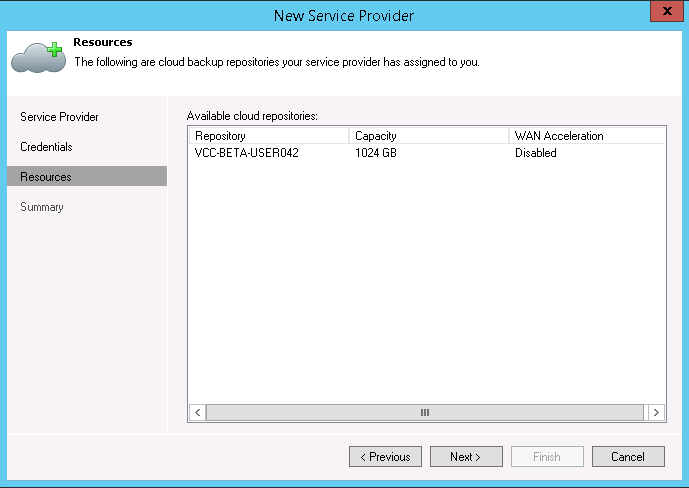
Hit Next and Finish
Once Completed you should see the Cloud Connect Gateway appear in the list in the Service Provider Tab. If you click on The Backup Repositories tab you should see the previously configured Cloud Connect Repository of Type Cloud with the Capacity and Free space shown.

You are now ready to Create Backup and Backup Copy jobs to the Cloud Repository.
For further information about Zettagrid product and service do not hesitate to contact sales@zettagrid.id or directly contact to +62-811-28-38-78 and +62-21-2789-9962
Once your vDC has been provisioned it’s time to start your Cloud by creating some Virtual Machines. You can create a Virtual Machine (VM) by using the vCloud Director. Here are the easy steps:
1. Login to your vCloud Director. Find your username and password within the My Account portal.

2. Go to the My Cloud tab and click on the + icon.

3. Choose Public Catalog from the drop down menu and select the OS for your new VM.

4. Enter the name for your vApp and select the VDC where your new VM will reside.

5. Give your VM a name. Don’t forget to choose a Storage Tier.

6. Select Networks.

7. Choose the resources you wish to assign to your VM.

8. Your new VM will now start provisioning. Once the VM has provisioned you will be able to see it listed.

For further information about Zettagrid product and service do not hesitate to contact sales@zettagrid.id or directly contact to +62-811-28-38-78 and +62-21-2789-9962

Zettagrid mengucapkan Selamat Menunaikan Ibadah Puasa Ramadhan 1440 H. Semoga kita senantiasa diberikan keberkahan di bulan yang suci ini.
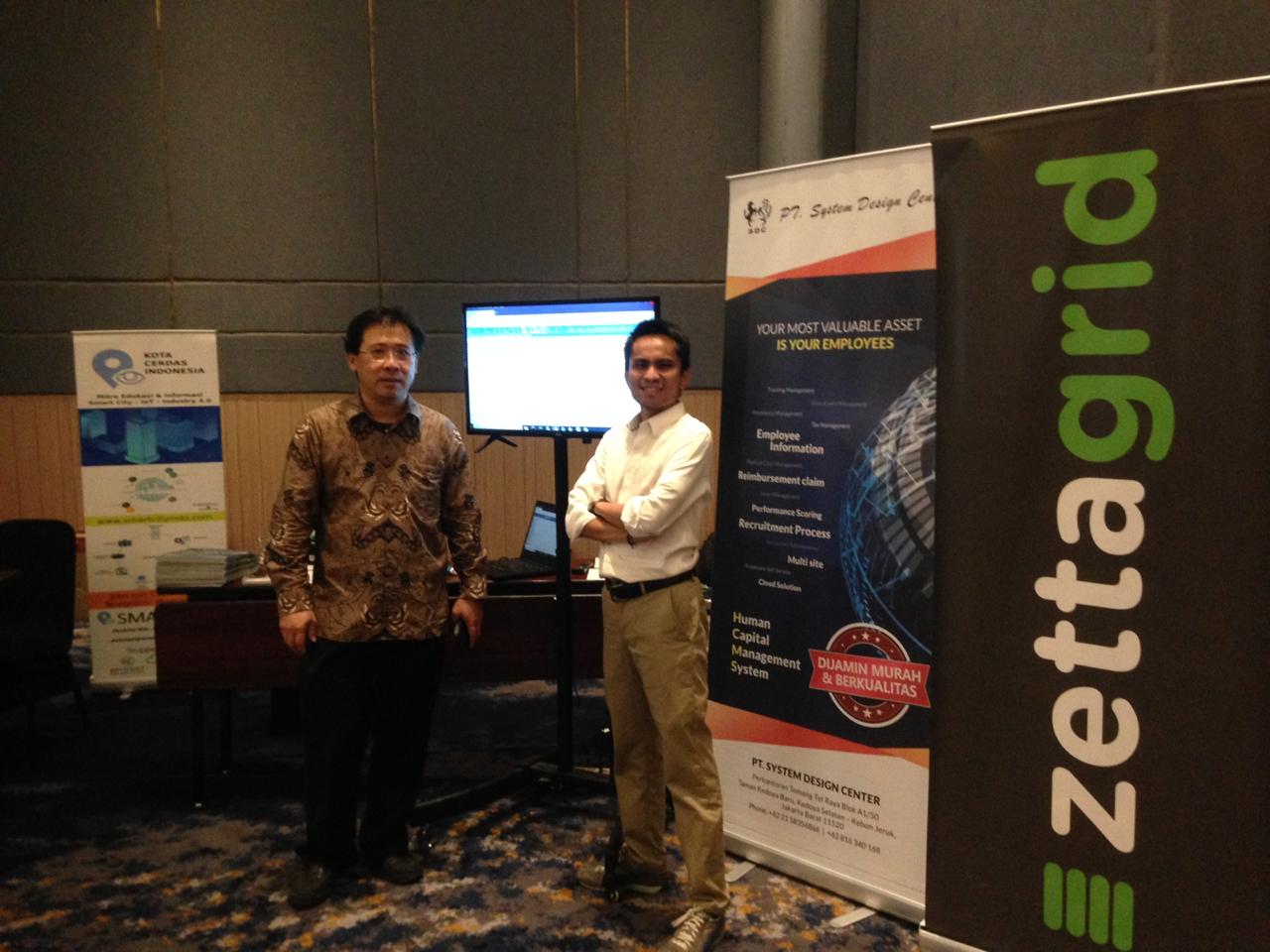
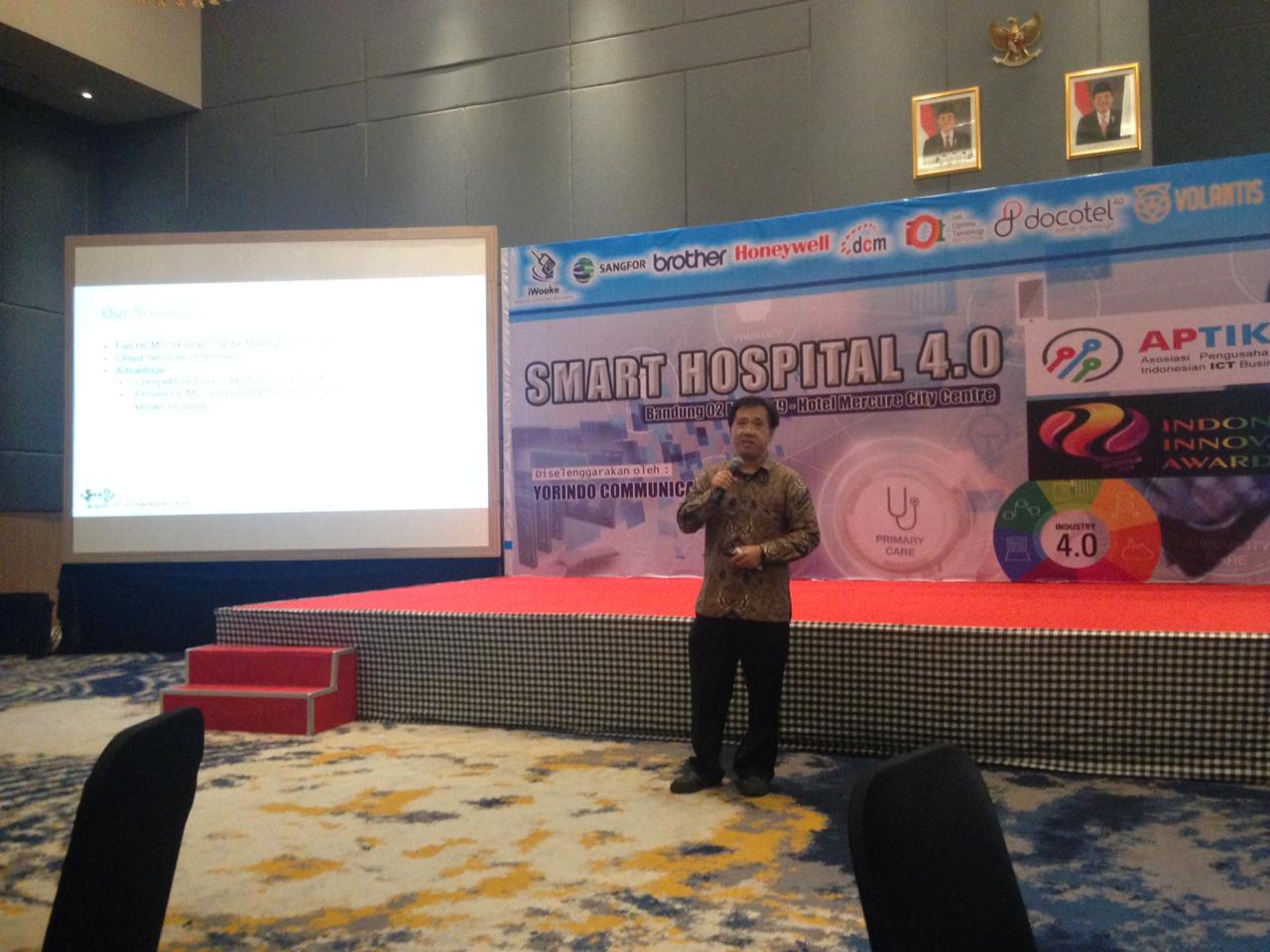
Zettagrid collaborate with one of their premium partner PT System Design Center (SDC) has participated in “Migration to Smart Hospital 4.0” event held by Aptiknas. More than 50 hospital participant around Bandung and West Java excited to come to this event.
Participant get the latest update from hospital technology which delivered by Aptiknas member. Hendry Janto, Director of PT SDC give presentation about Human Capital Management System (HCMS). HCMS is ERP cloud based solution deliver to hospital industry to suit their business needs.
For further information about Zettagrid product and service do not hesitate to contact sales@zettagrid.id or directly contact to +62-811-28-38-78 and +62-21-2789-9962
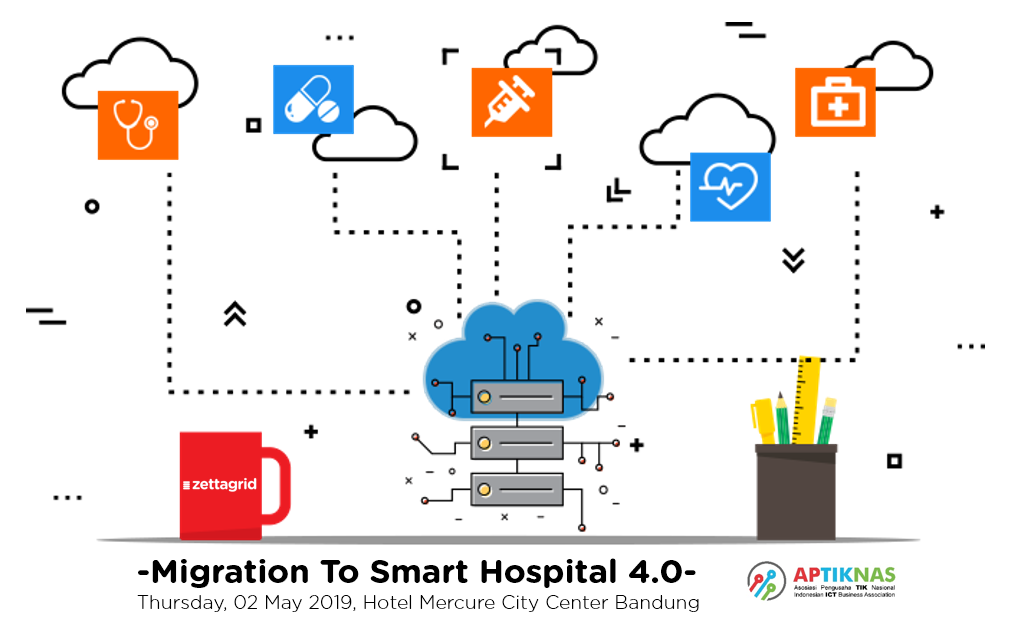 The Smart Hospital concept is aimed at creating a single IT environment composed of automated of specialized and auxiliary process. In the course of this new technological revolution, a huge amount of data, cloud computing services, machine learning methods and artificial intelligence solutions are being combined.
According Frost & Sullivan, 10% of hospital will become or step towards becoming “Smart Hospital” by 2025. Smart Hospital utilize health IT infrastructure technology such as mobile devices, data analytics solutions and cloud computing.
The process of transitioning IT infrastructure to support a smart hospital can be challenging, but organizations need to remember that the transformation must take place in stages. Cloud computing for storage is one of the most significant steps healthcare organizations can take towards becoming a smart hospital.
Cloud-based tools and cloud-based storage are key to rapidly expanding health IT infrastructure. The elastic environment gives healthcare organizations the opportunity to expand their infrastructure without spending too much money toward on-premises tools.
Public Cloud is the most scalable data storage solution. Storage space can be added or dropped as the size of an organization changes. This makes public cloud popular for temporary projects as well as data migration.
Learn more about Smart Hospital and how cloud computing become one of key element that embracing digital transformation in healthcare industry at the event “Migration To Smart Hospital 4.0”. This event is held by Aptiknas in collaboration with Yorindo Communication. For event registration by clicking through button below.

Virtual Data Center (VDC) simplifies your first step to a fully virtualized data center architecture by allowing you to rapidly provision and easily manage pool of virtual machines/servers for every business needs. Forget predefined instance sizes and avoid the complexity of networking and security as your flexibly scale up and scale down the virtual resources without breaking the bank.
Once you have purchased your Virtual Data Centre it will be instantly available. Your pool of resources will be ready to go and before you jump straight in and start creating your environment, we recommend you read this page to decide how you want to structure your data center. This information could save you a lot of time in the future.
VDC is beneficial to virtually any business needs, such as R&D/pilot projects, file servers, email, ERP system, custom applications and active directory.
Ready to start the journey of VDC? Here is the simple guide to start it StartVDC
For further information about Zettagrid product and service do not hesitate to contact sales@zettagrid.id or directly contact to +62-811-28-38-78 and +62-21-2789-9962

SecondSite DRaaS simplifies your disaster recovery/business continuity strategy. Delivered through cloud, the service allows you to rapidly deploy a disaster recovery site without owning the technology, buying hardware and training personnel for your secondary site. Excluding failover, failback and disaster recovery processes is just one click away.
Built on the award-winning Zerto platform, the solution creates redundancy for mission critical applications and data which you need to recover quickly when catastrophic events, such as hardware failure, human error, natural disasters and power failure, occur. It enables near real time DR failover and failback with RPO’s of only seconds and RTO’s of few minutes.
This service suits all business due to it’s scalability. Whether you are protecting one VM or 1,000 VMs. Secondsite DR stays as reliable and affordable solution for small business and large enterprises.
Learn more how to quick setup SecondSite DRaaS by clicking this link QuickSetup
For further information about Zettagrid product and service do not hesitate to contact sales@zettagrid.id or directly contact to +62-811-28-38-78 and +62-21-2789-9962
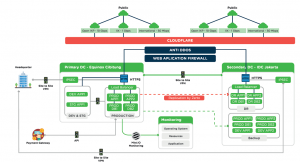
Responding to these concerns, Zettagrid brings the most advanced self-service cloud infrastructure (IaaS) platform to Indonesia. Truly automated, easy to use, and super scalable, Zettagrid platform helps customers to enjoy the true benefits of cloud computing.
For further information about Zettagrid product and service do not hesitate to contact sales@zettagrid.id or directly contact to +62-811-28-38-78 and +62-21-2789-9962