
Cloud Service Provider Indonesia - Reliable, Trusted, Secure - Zettagrid Indonesia
  • Products
    • Cloud Compute
      • VMware Cloud Foundation
      • Bare Metal Cloud
      • GPU Cloud
    • Backup
      • Veeam Backup
    • Disaster Recovery
      • Zerto SecondSite
      • Veeam Replication
    • Software Licensing
      • All Vendors
  • Features
    • Availability Zones
    • Control Panel
    • Security & Compliance
  • Partners
    • Partner Program
    • VMware VCSP Transition
    • Find a Partner
    • Become a Partner
  • Resources
    • Support Central
    • Support Card
    • Status Page
    • Submit Support Ticket
    • Terms and Conditions
  • Company
    • About Us
    • Management Team
    • Our Regional Team
    • News
    • Contact Us
  • Login
  • Create Account
  • Promo
  • Menu Menu
Blog - Latest News

Langkah Menggunakan Cloud Demo Zettagrid
June 29, 2020/in Blog, News, Uncategorized/by admin

Langkah Menggunakan Cloud Demo Zettagrid

VDC live

Cloud computing memang sedang naik daun di masa pandemi ini. Selain menjadi solusi yang digunakan sebagai infrastruktur digital, cloud juga menjadi pilihan solusi IT sementara selama pandemi berlangsung.

Lalu, pernahkah anda melihat Control Panel pada Cloud Provider yang akan anda gunakan? Atau apakah User Experience dari Control Panel  cloud tersebut memudahkan anda dalam bekerja? Kemudian apakah anda dapat mengetahui fasilitas apa saja yang dapat dilakukan melalui Control Panel tersebut?

Salah satu penyedia layanan cloud computing di Indonesia yaitu Zettagrid, menawarkan fasilitas Cloud Demo. Fasilitas ini merupakan sandbox yang dapat mengantarkan anda untuk merasakan langsung cara kerja dari Virtual Datacenter yang didukung oleh VMware. Dalam fasilitas ini, anda dapat melakukan beberapa aktifitas dasar atau basic seperti pembuatan VM, vApps, dan membuat internal network. yang perlu digaris bawahi, untuk merasakan fasilitas Cloud Demo ini, anda tidak terhubung ke internet.

Yuk kita simak langkah menggunakan fasilitas Cloud Demo dari Zettagrid yang didukung oleh VMware:

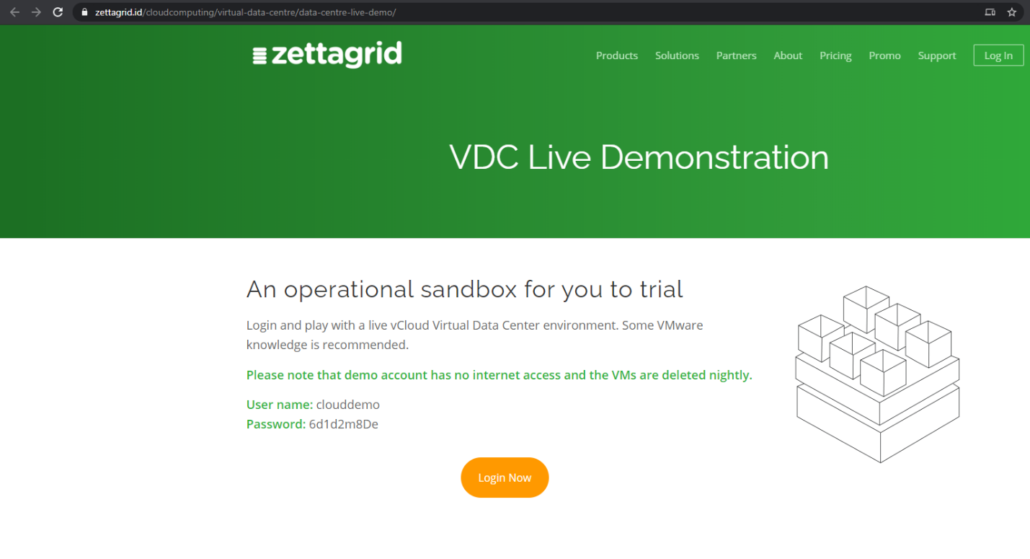
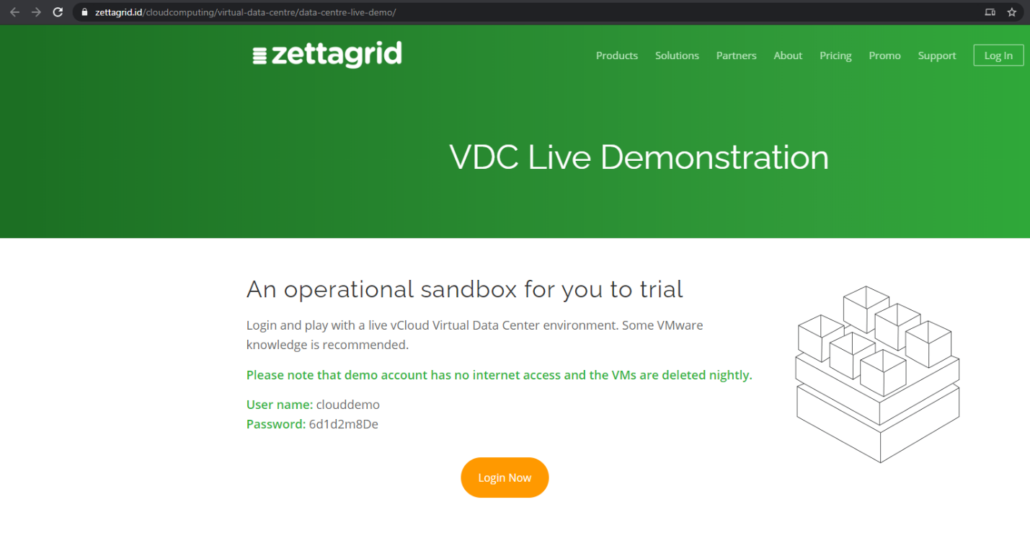
  1. Klik https://www.zettagrid.id/vdc-live-demonstration/ pada web browser anda.
  2. Setelah melakukan akses ke halaman tersebut akan muncul tampilan seperti gambar dibawah. Pada halaman ini, anda dapat mengetahui informasi dari User name dan Password vCloud Director yang dapat anda gunakan untuk log in dan melihat apa yang ada dibalik Control Panel dari VDC. Kemudian Klik Log In now.
Cloud Demo VMware

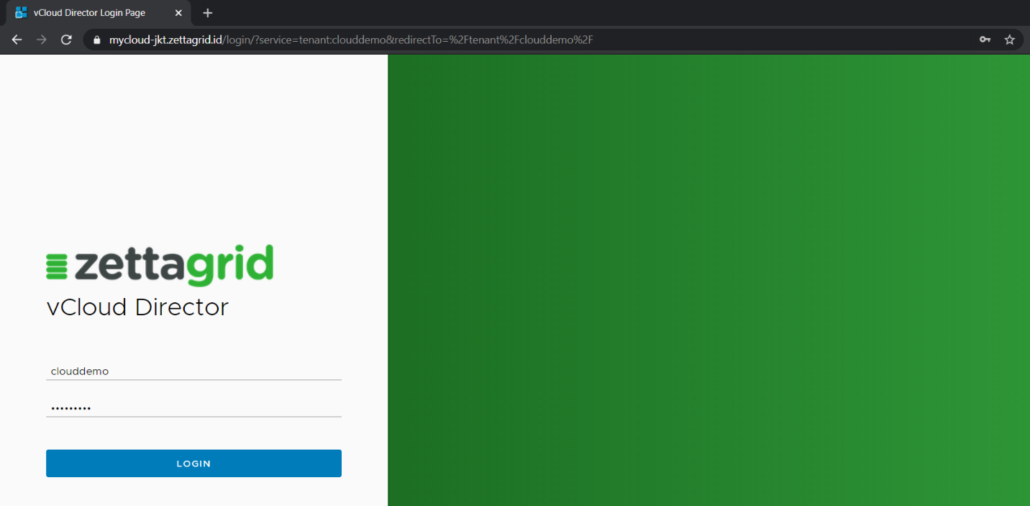
 3. Setelah itu anda akan dibawa menuju halaman login vCloud Director, pada halaman ini Anda dapat memasukkan username dan password  yang tertera pada halaman sebelumnya.
Cloud Demo VMware

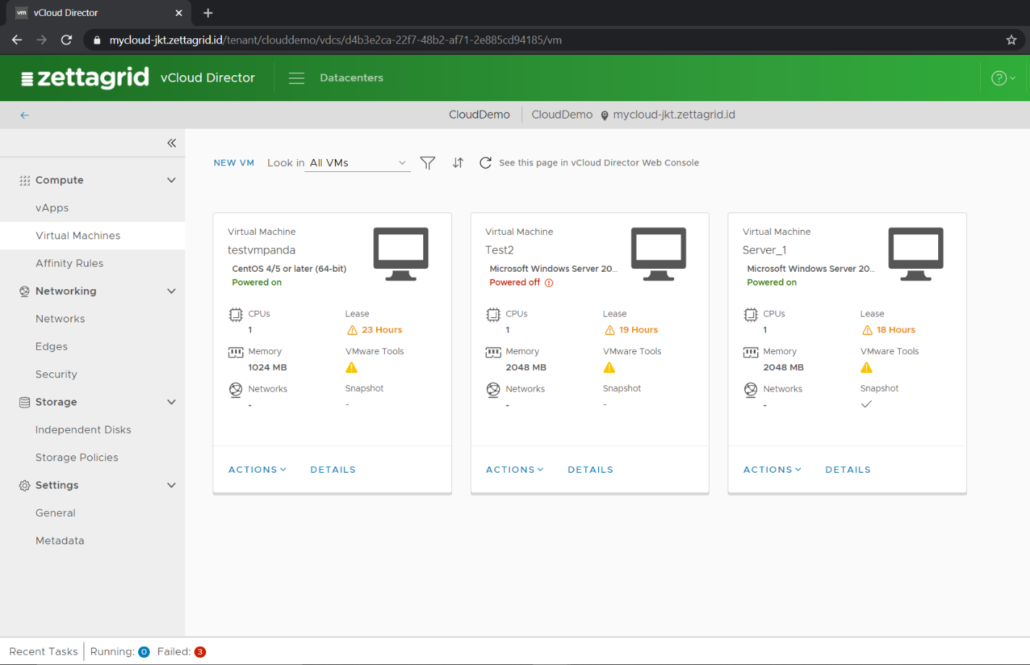
Berikut tampilan setelah login ke dalam vCloud Director, Setelah login akan tampil list Virtual Machines. 
VDC demo 

Untuk membuat Virtual Machines baru dapat mengikuti langkah-langkah berikut :  


  1. Klik “New VM” yang terletak dibagian atas kiri pada list VM. 
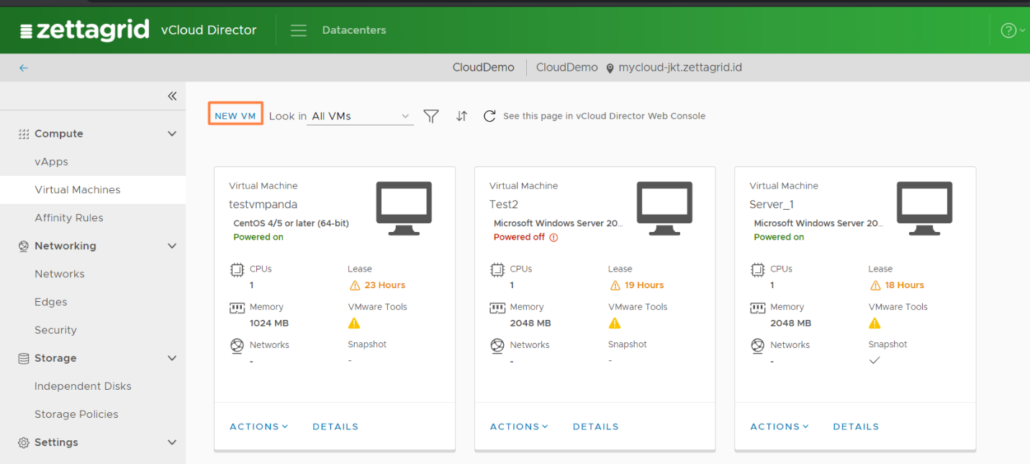
Zettagrid Live Demo

2. Pada halaman ini Anda dapat menginputkan VM Name, Computer Name dan OS yang diinginkan. Setelah menginputkan VM Name dan memilih OS dapat klik “OK”. 
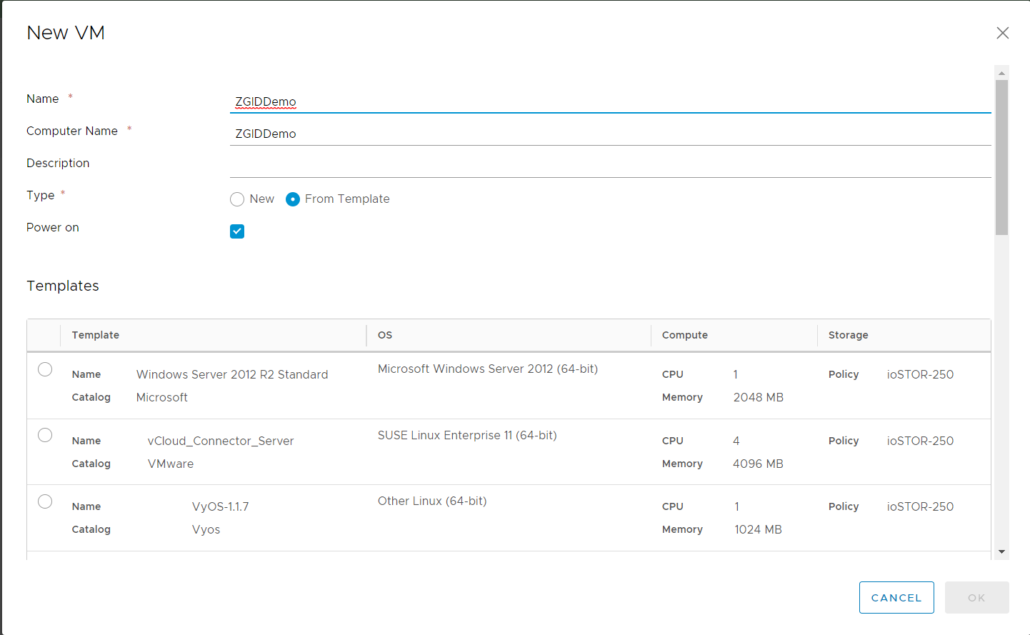
 Zettagrid Live Demo

 3. Setelah anda klik “OK” tunggu beberapa saat untuk proses Provisioning, Setelah proses Provisioning selesai makan VM akan dalam status “Powered On”.
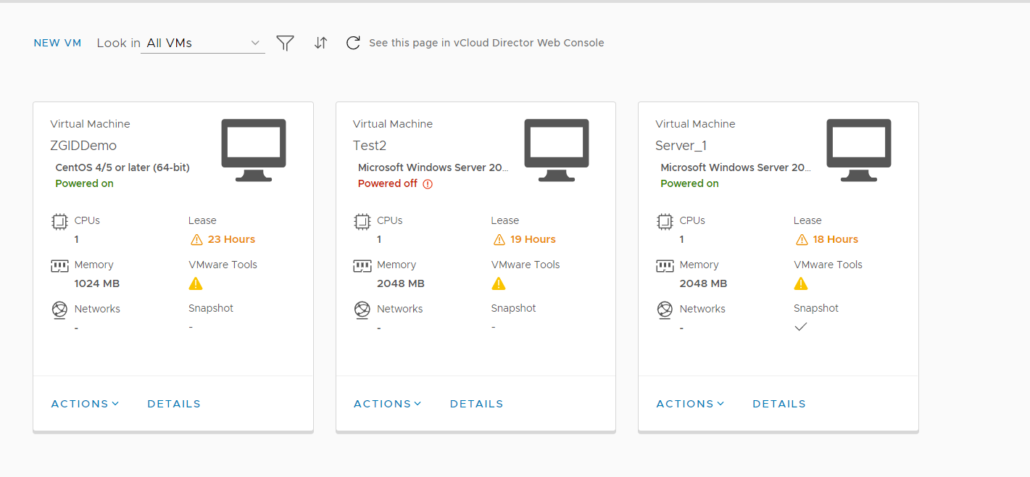
Virtual Data Center


4. Untuk mengakses console sendiri terdapat beberapa cara, Cara paling mudah adalah dengan menekan button logo Monitor PC atau melalui menu “Actions” > “Launch Web Console” 
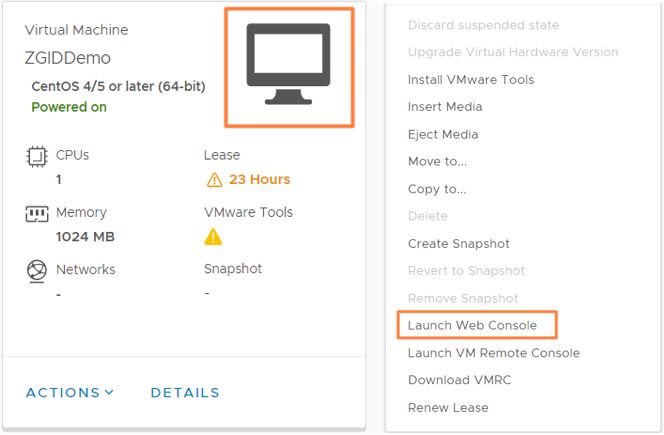
VMware VDC


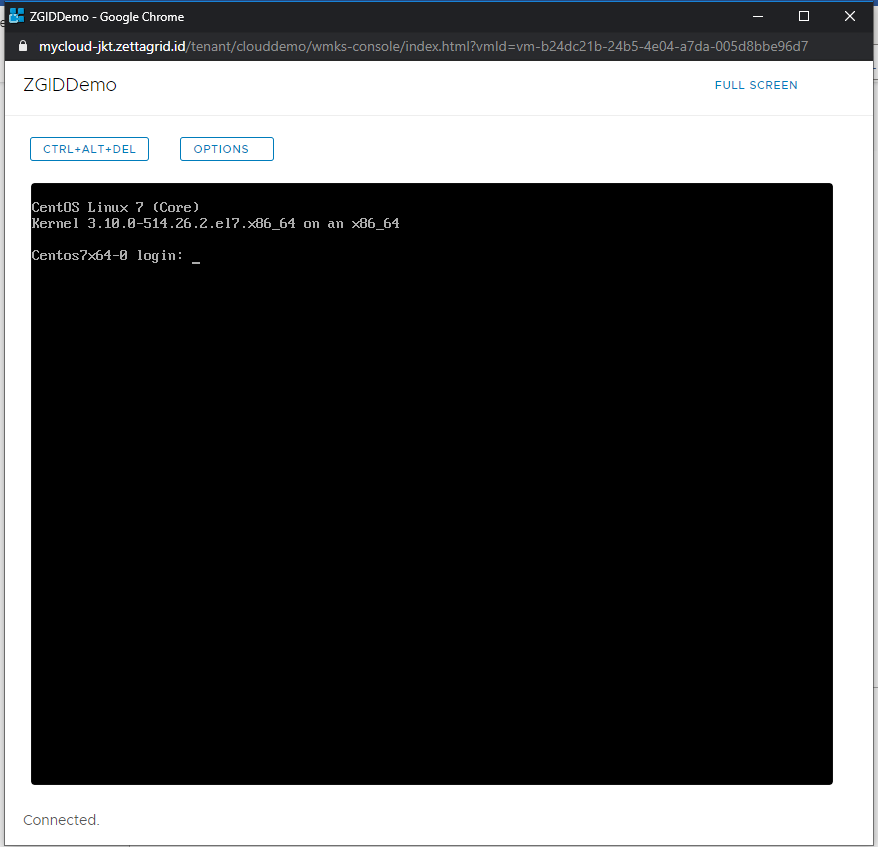
5. Berikut tampilan Web Console vCloud Director. 
VMware VDC

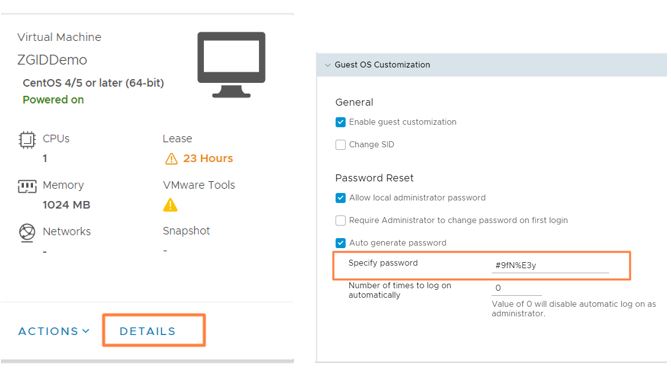
 6. Untuk password root login VM dapat dilihat pada Details > Guest OS Customization 
VMware VDC

Begitulah langkah-langkah untuk membuat VM pada Cloud Demo dari Zettagrid.

Perlu diingat, layanan ini bersifat sandbox, dimana VM akan dihapus pada malam hari oleh sistem dan beberapa fitur pada layanan Cloud Demo akan dibatasi. Jika anda tertarik untuk mendalami fitur vCoud Director, anda dapat menghubungi tim kami di sales@zettagrid.id untuk menikmati FREE TRIAL dari Zettagrid Indonesia.

Tags: Cloud computing, Cloud Demo, Cloud Infrastructure, COVID-19, DRaaS, IaaS, IT Solution, Pandemic, vCloud, Virtual Data Center, Virtual Private Server, Virtual Server, VMware, Zettagrid
Share this entry
  • Share on Facebook
  • Share on X
  • Share on WhatsApp
  • Share on Pinterest
  • Share on LinkedIn
  • Share on Reddit
  • Share by Mail
https://www.zettagrid.id/wp-content/uploads/2023/03/ZETTAGRID_color_white_brandmark_3_vertical_v1-300x138-1.png 0 0 admin https://www.zettagrid.id/wp-content/uploads/2023/03/ZETTAGRID_color_white_brandmark_3_vertical_v1-300x138-1.png admin2020-06-29 23:53:392023-07-20 18:22:04Langkah Menggunakan Cloud Demo Zettagrid

ABOUT US

  • Company
  • Security & Compliance
  • Terms & Conditions
  • Latest News
  • Partner Program
  • Find a Partner
  • Become a Partner

PRODUCTS

  • Cloud Compute
  • Backup & Storage
  • Disaster Recovery
  • Software Licensing

GET HELP

  • Support Central
  • Service Status
  • Twitter/X
  • Office Locations
  • Email

CALL US

  • +62 811 28 38 78
  • +62 21 2789 9962
Create Account
Login
© Zettagrid | Zettagrid is a registered trademark of Zettagrid Pty Ltd

Terms of Service

Data Ownership

Data Sovereignty

Customer Backups

Privacy Policy

Link to: IT Webinar Accelerate Your Business Innovation With Cloud Link to: IT Webinar Accelerate Your Business Innovation With Cloud IT Webinar Accelerate Your Business Innovation With Cloud Link to: Mengapa Fintech Harus Menggunakan Cloud Lokal Indonesia? Link to: Mengapa Fintech Harus Menggunakan Cloud Lokal Indonesia? Mengapa Fintech Harus Menggunakan Cloud Lokal Indonesia?
Scroll to top Scroll to top Scroll to top

This site uses cookies. By continuing to browse the site, you are agreeing to our use of cookies.

OKLearn moreSettings

Cookie and Privacy Settings


How we use cookies

We may request cookies to be set on your device. We use cookies to let us know when you visit our websites, how you interact with us, to enrich your user experience, and to customize your relationship with our website.

Click on the different category headings to find out more. You can also change some of your preferences. Note that blocking some types of cookies may impact your experience on our websites and the services we are able to offer.

Essential Website Cookies

These cookies are strictly necessary to provide you with services available through our website and to use some of its features.

Because these cookies are strictly necessary to deliver the website, refusing them will have impact how our site functions. You always can block or delete cookies by changing your browser settings and force blocking all cookies on this website. But this will always prompt you to accept/refuse cookies when revisiting our site.

We fully respect if you want to refuse cookies but to avoid asking you again and again kindly allow us to store a cookie for that. You are free to opt out any time or opt in for other cookies to get a better experience. If you refuse cookies we will remove all set cookies in our domain.

We provide you with a list of stored cookies on your computer in our domain so you can check what we stored. Due to security reasons we are not able to show or modify cookies from other domains. You can check these in your browser security settings.

Other external services

We also use different external services like Google Webfonts, Google Maps, and external Video providers. Since these providers may collect personal data like your IP address we allow you to block them here. Please be aware that this might heavily reduce the functionality and appearance of our site. Changes will take effect once you reload the page.

Google Webfont Settings:

Google Map Settings:

Google reCaptcha Settings:

Vimeo and Youtube video embeds:

Privacy Policy

You can read about our cookies and privacy settings in detail on our Privacy Policy Page.

Privacy Policy
Accept settingsHide notification only