
Cloud Service Provider Indonesia - Reliable, Trusted, Secure - Zettagrid Indonesia
  • Products
    • Cloud Compute
      • VMware Cloud Foundation
      • Bare Metal Cloud
      • GPU Cloud
    • Backup
      • Veeam Backup
    • Disaster Recovery
      • Zerto SecondSite
      • Veeam Replication
    • Software Licensing
      • All Vendors
  • Features
    • Availability Zones
    • Control Panel
    • Security & Compliance
  • Partners
    • Partner Program
    • VMware VCSP Transition
    • Find a Partner
    • Become a Partner
  • Resources
    • Support Central
    • Status Page
    • Submit Support Ticket
    • Terms and Conditions
  • Company
    • About Us
    • Management Team
    • Our Regional Team
    • News
    • Contact Us
  • Login
  • Create Account
  • Promo
  • Menu Menu
Blog - Latest News

5 Common Causes of Data Loss in Office 365
August 10, 2020/in Blog, News/by admin

data loss in office 365

5 Common Causes of Data Loss in Office 365


Nowadays, we could see that lot of companies start moving its IT workload to the cloud. Beside the trusted security system, cloud is more user friendly and easy to set up. Furthermore, it allows workforce to move faster, collaborate across business, and reduce operational costs for the company.

One of the most popular cloud categories that usually use for business is Software as a Service (SaaS), for example Office 365 by Microsoft.  Office 365 offers various features, from e-mail, cloud apps, until file sharing. Even though people think that it is secure enough, do you know that companies could also lost their data on Office 365?
data loss in office 365

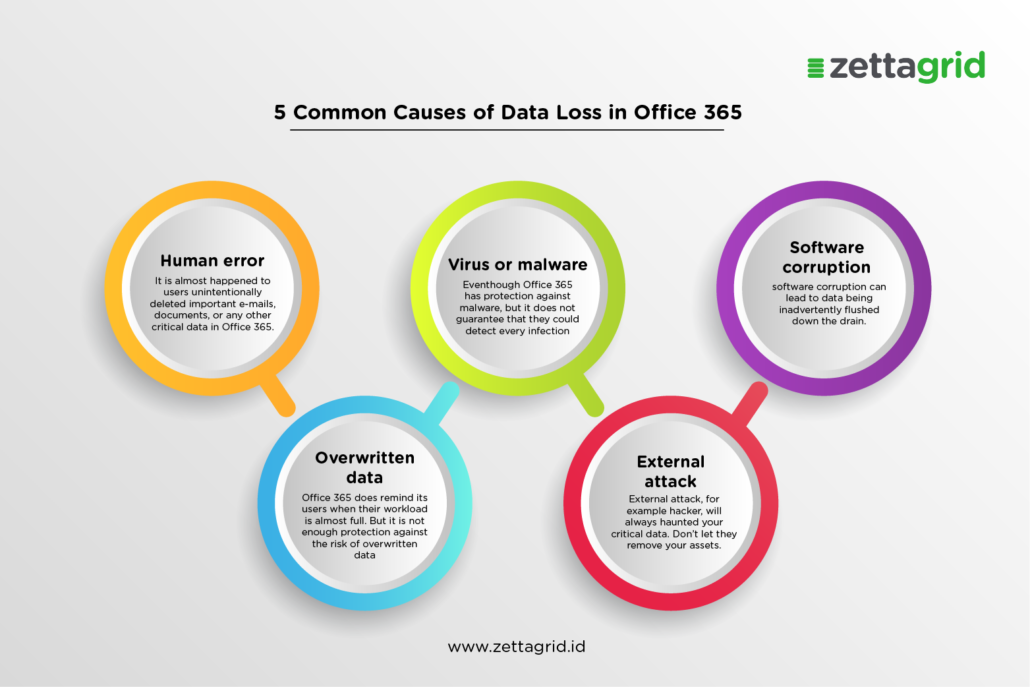
This data loss caused by several common reason such as; Human error, Virus or malware, Software Corruption, Overwritten Data, and Hacker attack. Read on the 5 common causes of Data Loss in Office 365:

Human error

Human error that mostly happened is accidental deletion within Office 365. It is almost happened to users unintentionally deleted important e-mails, documents, or any other critical data in Office 365.

A common reason why users inadvertently deletes their data is because they think it is no longer needed. But after sometimes they will need in again suddenly for some reasons.

Or also they forget click the wrong button and could not get the data back before they realized it.

Virus or malware

Veeam stated that Malware and viruses have done serious damage to organizations globally in just the past year alone unexceptionally for Office 365. Even Office 365 has protection against malware, but it does not guarantee that they could detect every infection.

Software corruption

Software Corruption is one of the big cause of data loss. For example, if users want to Install or update the Office 365 and then the system suddenly have problem, and the data lost the second after.

Overwritten data

Office 365 does remind its users when their workload is almost full. But it is not enough protection against the risk of overwritten data. Users could lost their oldest e-mail, data, documents, or any critical data if their data space is not enough anymore.

External attack

It is true that technology growth is faster than we think and bring a lot positive changes in our life. In other hand, it is also bring negativity, one of them is hacker. It is possible for Office 365 to get attacked by hacker. For example, if there is a phishing e-mail and then the user click it and hacker could remove the data easily after.

So, could you imagine if you lost your critical documents on Office 365? How to prevent this accident? Stay update with Zettagrid to find the solution with Veeam Office 365 Backup on Zettagrid.

Contact us for more information aboutt Veaam Office 365 Backup on Zettagrid send us e-mail at sales@zettagrid.id or click here.

Tags: backup cloud, backup email, causes of data loss, cloud Indonesia, cloud lokal indonesia, Cloud Provider Indonesia, Cloud Service Provider, Cloud Service Provider Indonesia, Data Loss, data loss in office 365, data loss prevention, Microsoft Office 365, Office 365, Office 365 Backup, Veeam Software, Zettagrid
Share this entry
  • Share on Facebook
  • Share on X
  • Share on WhatsApp
  • Share on Pinterest
  • Share on LinkedIn
  • Share on Reddit
  • Share by Mail
https://www.zettagrid.id/wp-content/uploads/2023/03/ZETTAGRID_color_white_brandmark_3_vertical_v1-300x138-1.png 0 0 admin https://www.zettagrid.id/wp-content/uploads/2023/03/ZETTAGRID_color_white_brandmark_3_vertical_v1-300x138-1.png admin2020-08-10 09:27:212023-06-21 10:18:045 Common Causes of Data Loss in Office 365

ABOUT US

  • Company
  • Security & Compliance
  • Terms & Conditions
  • Latest News
  • Partner Program
  • Find a Partner
  • Become a Partner

PRODUCTS

  • Cloud Compute
  • Backup & Storage
  • Disaster Recovery
  • Software Licensing

GET HELP

  • Support Central
  • Service Status
  • Twitter/X
  • Office Locations
  • Email

CALL US

  • +62 811 28 38 78
  • +62 21 2789 9962
Create Account
Login
© Zettagrid | Zettagrid is a registered trademark of Zettagrid Pty Ltd

Terms of Service

Data Ownership

Data Sovereignty

Customer Backups

Privacy Policy

Link to: 7 Alasan Mengapa Arupa Cloud Desktop Menjadi Solusi Tepat Saat WFH Link to: 7 Alasan Mengapa Arupa Cloud Desktop Menjadi Solusi Tepat Saat WFH 7 Alasan Mengapa Arupa Cloud Desktop Menjadi Solusi Tepat Saat WFH Link to: 3 Risks That Weighing Your Business After Data Loss in Office 365 Link to: 3 Risks That Weighing Your Business After Data Loss in Office 365 3 Risks That Weighing Your Business After Data Loss in Office 365
Scroll to top Scroll to top Scroll to top

This site uses cookies. By continuing to browse the site, you are agreeing to our use of cookies.

OKLearn moreSettings

Cookie and Privacy Settings


How we use cookies

We may request cookies to be set on your device. We use cookies to let us know when you visit our websites, how you interact with us, to enrich your user experience, and to customize your relationship with our website.

Click on the different category headings to find out more. You can also change some of your preferences. Note that blocking some types of cookies may impact your experience on our websites and the services we are able to offer.

Essential Website Cookies

These cookies are strictly necessary to provide you with services available through our website and to use some of its features.

Because these cookies are strictly necessary to deliver the website, refusing them will have impact how our site functions. You always can block or delete cookies by changing your browser settings and force blocking all cookies on this website. But this will always prompt you to accept/refuse cookies when revisiting our site.

We fully respect if you want to refuse cookies but to avoid asking you again and again kindly allow us to store a cookie for that. You are free to opt out any time or opt in for other cookies to get a better experience. If you refuse cookies we will remove all set cookies in our domain.

We provide you with a list of stored cookies on your computer in our domain so you can check what we stored. Due to security reasons we are not able to show or modify cookies from other domains. You can check these in your browser security settings.

Other external services

We also use different external services like Google Webfonts, Google Maps, and external Video providers. Since these providers may collect personal data like your IP address we allow you to block them here. Please be aware that this might heavily reduce the functionality and appearance of our site. Changes will take effect once you reload the page.

Google Webfont Settings:

Google Map Settings:

Google reCaptcha Settings:

Vimeo and Youtube video embeds:

Privacy Policy

You can read about our cookies and privacy settings in detail on our Privacy Policy Page.

Privacy Policy
Accept settingsHide notification only